
Shopping for a laser engraver in the UK feels like a three-way tug-of-war: do you prioritise enclosed Class 1 safety for home use, raw cutting power for thicker wood and acrylic, or a compact, beginner-friendly machine that just fits your desk? Go too small and you'll outgrow the work area in weeks, go too powerful and open-frame and you'll worry about smoke, glare and ventilation. Here's how the top enclosed, high-power and portable picks actually balance safety, precision and everyday practicality.
Top Recommendations at a Glance


Key Takeaways and Quick Advice
|
Carverall A1 Pro 5W Class 1 Desktop Laser Engraver with Camera
|
Woxcker Laser Engraver and Cutter Machine 10W
|
LONGER RAY5 mini Laser Engraver
|
|
|---|---|---|---|
|
|
|
|
|
| Build & Material | Fully enclosed Class 1 metal housing with filtered viewing shield, door sensor auto-stop and tilt protection | Fully enclosed steel and acrylic cabinet with multi-layer safety sensors and ventilation-ready design | Open-frame portable anodised aluminium gantry, lightweight and desk-friendly |
| Power & Operation | 5W diode laser, HD camera alignment, dual-cable USB connection, manual focus | 10W diode laser, enclosed operation, manual focus, extraction fan port for smoke management | 2.5W diode laser, ultra-fine laser spot, WiFi + smartphone app and USB control |
| Capacity / Dimensions | Compact 100 x 100mm work area, desktop footprint for small-item personalisation | Large 300 x 300mm work area, benchtop cabinet for signs, gifts and batch work | Compact portable work area around 130mm class, ideal for small desks and easy storage |
| Standout Feature | HD camera visual positioning to preview, drag-and-place designs accurately | 10W enclosed cutting power combining higher output with home safety sensors | Highly portable WiFi and app workflow with quick out-of-box setup |
| Best For | Safety-conscious beginners and families engraving tags, leather, wood and coated metal | DIY makers and home crafters needing larger signs, gifts and light cutting tasks | Hobbyists with limited space wanting simple, portable fine-detail engraving |
| Check Price on Amazon | Check Price on Amazon | Check Price on Amazon |
01
Safer Enclosed Engraving with Camera-Perfect Placement for Beginners
Built around a compact aluminum and plastic cube with a fully enclosed Class 1 housing, the A1 Pro prioritizes safer home and classroom use with auto shutoff when the orange shield lifts and tilt protection for added reassurance. Verified owners consistently highlight how approachable it feels for beginners, with pre-assembly out of the box, height adjustment for taller objects, and a removable base for engraving larger boards. The integrated HD camera with fill light is the real workflow upgrade, enabling drag-and-drop preview and batch placement that reduces misalignment waste on wood, leather, coated metal, paper and glass. With genuine 5W output, fast travel speeds and fine precision, it handles detailed coasters, keyrings, gifts and small-shop batches well, plus light cutting of thin plywood and paper. Software setup takes some patience, requiring drivers, calibration and dual cable connections, and LightBurn users report a smoother experience than the free app, but overall satisfaction remains high for entry-level creative work.
- Enclosed Class 1 housing with auto-stop shield and tilt protection feels reassuring for home use
- Built-in HD camera dramatically reduces alignment errors and material waste
- Sharp detail on wood, leather, paper and coated metal with capability for thin cutting tasks
- Compact portable design with height adjustment and removable base for oversized boards
- Compact 100 x 100mm work area limits larger projects without repositioning
- Initial driver install, camera calibration and dual-cable setup can feel technical for absolute beginners, and door sensor can be temperamental
02
Enclosed 10W precision that makes home engraving safer, faster and more creative
Positioned as a home-friendly step up from open-frame diodes, this Woxcker L2 Max pairs a 10W diode module with a fully enclosed 300 by 300mm chamber aimed at DIY gifts and small-batch work. Verified owner sentiment points to crisp text and photo engraving on wood, coated metal, leather and acrylic thanks to the fine compressed spot, plus enough punch for light cutting when paired with air assist and a honeycomb bed. Day-to-day usability is a clear strength, with Wi-Fi, USB, app and TF-card offline options alongside LightBurn and LaserGRBL support for common image and vector formats. Assembly earns consistent praise for arriving with the base pre-built and only the enclosure to secure, while the lid-open auto-stop, flame sensing, tilt protection, lock and e-stop add welcome reassurance indoors. Trade-offs remain, including a real software learning curve, occasional connection setup friction and the need for added ventilation to manage smoke during longer cuts.
- Spacious 300x300mm area handles larger gifts, signs and batch layouts with ease
- Enclosed design with comprehensive safety sensors inspires more confidence at home
- Sharp, clean detail on wood, leather, acrylic and coated metals
- Flexible connectivity and broad file format support suit beginners to LightBurn users
- Software setup and focusing present a learning curve for complete beginners
- Smoke management still benefits from added ventilation or extraction during cutting
03
Tiny desktop footprint with sharp detail for beginner makers
The RAY5 mini positions itself as an entry-friendly desktop engraver that prioritizes portability and simplicity over raw cutting power. Its aluminum frame keeps weight low at just over two kilos while feeling rigid enough for consistent results, and the compact 130 by 140 mm work area suits coasters, tags, small signage and personalized gifts rather than large panels. Verified owners consistently highlight fast out-of-box setup, intuitive WiFi and mobile app control, and compatibility with free LaserGRBL software, which lowers the learning curve for complete beginners. Engraving detail stands out for the class, with an ultra-fine spot that renders crisp lines and photo-style shading on wood, leather and coated materials. Trade-offs are expected at this power level, with limited cutting ability on thicker wood and no real capability on bare metal, plus some trial and error on settings and occasional setup hiccups. Support responsiveness earns repeated praise and helps offset early frustrations.
- Compact portable aluminum build suits small desks and easy storage
- Quick out-of-box setup with beginner-friendly WiFi and phone control
- Sharp detailed engraving on wood, leather, acrylic and anodized aluminum
- Responsive long-term customer support praised by verified owners
- 2.5W output limits cutting on thicker wood and cannot handle bare metal
- Small work area and settings learning curve require trial and error
 04
Pocket-size 5.5W precision that makes detailed DIY engraving fast and fun
The Ray5 Mini is built around convenience, arriving as a pre-assembled one-piece unit with a rigid frame and simple dovetail focus adjustment that keeps setup approachable for first-time users. Its compact footprint and light 2.6kg build make it easy to place on a desk, store away, and reposition for small-batch crafts. In daily use, the 5.5W diode module with tight focus delivers crisp detail on wood, leather, coated aluminum and acrylic, while high travel speeds help keep gift tags, coasters and personalization jobs moving quickly. WiFi and mobile app control plus offline capability add welcome flexibility for casual makers. Verified owner sentiment leans strongly positive for ease of use and creative fun, with praise for responsive brand support. Balance that against the very small work area, a real learning curve around LaserGRBL and LightBurn, and isolated reports of early laser failure and confusing wiring labels that may frustrate absolute beginners.
- Arrives pre-assembled with simple dovetail focus for fast beginner setup
- Fine spot delivers clean, detailed engraving on wood, leather and coated materials
- WiFi, app and offline control add flexible phone-to-workshop workflow
- Emergency stop, flame sensor and included eye protection boost everyday safety
- Compact and lightweight design is perfect for desks and small craft spaces
- 130 x 130 mm work area is too small for larger signs or batch production
- Real learning curve with third-party software, LightBurn often needed for best results
- Isolated owner reports of early laser issues and confusing wiring documentation
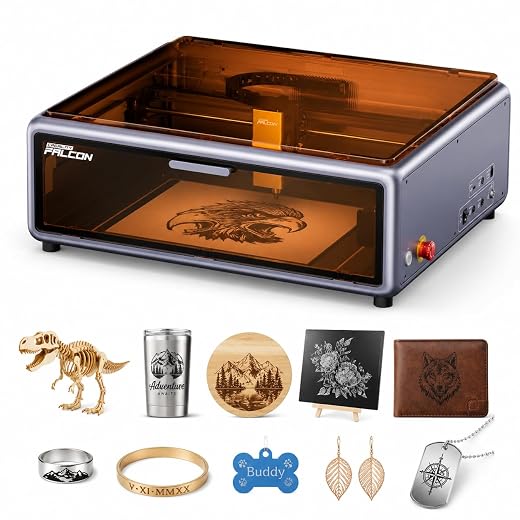 05
Enclosed Class 1 safety with camera-guided precision built for confident beginners
Positioned as Creality’s beginner-focused enclosed option, the Falcon A1 10W pairs a rigid metal die-cast frame with dual transparent panels and a practical top-and-side double-door layout for loading and adjustment. Its 381 x 305mm work area feels generous for home craft, small-batch personalization and light workshop use, while CoreXY motion supports fast, smooth operation for everyday projects. Verified owner sentiment consistently highlights quick unboxing to first engraving, intuitive Design Space software with automatic material recognition, and the time-saving benefit of the panoramic HD camera for precise placement and reduced waste. Engraving detail stands out thanks to the ultra-fine laser spot, with clean results on wood, leather, coated metal and acrylic, aided by integrated air assist. Trade-offs are realistic for the class: thicker plywood benefits from test settings, effective fume extraction needs planning, and full camera features depend on a PC connection. Overall, it reads as a thoughtful safety-first gateway machine.
- Enclosed Class 1 safety concept removes need for glasses and contains noise and smoke
- Camera-guided positioning plus auto settings shortens learning curve and saves material
- Fine spot size delivers sharp, detailed engraving on wood, leather and coated materials
- Beginner-friendly native software with LightBurn and LaserGRBL compatibility for growth
- 10W output suits light cutting but needs test passes on thicker plywood to avoid scorching
- Full camera function requires PC connection and fume extraction needs window venting or purifier planning
 06
Tiny Desktop Powerhouse For Crisp First-Time Engraving
The Longer Ray5 3.5W Mini positions itself as an accessible entry point into diode engraving, pairing a lightweight metal gantry with a compact desktop footprint that suits apartments and craft corners. Market research shows its 0.04mm spot and high travel speeds deliver surprisingly crisp results on wood, leather, acrylic and anodized aluminum for such a small machine, with verified owners frequently praising clean lines on keychains, jewelry and small gifts. Setup is straightforward mechanically, while Wi-Fi, USB, app and offline control add welcome flexibility. Balance comes from realistic limits: the 140x130mm field demands careful positioning and is strictly for small projects, thin-material cutting only, and there is no included base protection so a sacrificial board is essential. Owners also flag smoke and odor, a learning curve around LaserGRBL and LightBurn, and occasional Wi-Fi pairing friction. For patient beginners focused on detail over scale, sentiment remains largely positive.
- Compact and lightweight design fits easily on home desks and small workspaces
- Fine spot size produces clean, detailed engraving on wood, leather and acrylic
- Flexible connectivity including Wi-Fi and mobile control for cord-free projects
- Thoughtful safety touches with shield, eyewear and emergency stop included
- Very small work area limits projects to mini-format items only
- No baseplate included, so table protection and ventilation setup are required
- Software learning curve and manual positioning can frustrate first-time users
Buyer Questions and Expert Answers
What is the best overall choice for most homes in the United Kingdom?
The Carverall A1 Pro 5W is the most balanced pick for most homes because its fully enclosed Class 1 design with auto-stop and tilt protection feels safest indoors, while the HD camera makes alignment almost foolproof on wood, leather, paper and coated metal. Its trade-off is the compact 100 x 100mm area, so it suits jewellery, coasters, tags and small gifts rather than large signs.
What is the difference between 2.5W, 5W and 10W diode lasers?
Wattage controls speed and cutting ability, not just darkness. A 2.5W like the LONGER RAY5 mini excels at slow, ultra-fine surface engraving on wood, leather and anodized aluminium. A 5W adds crisper detail and can cut thin plywood, paper and leather in multiple passes. A 10W like the Woxcker cuts noticeably thicker wood and acrylic faster and handles batch work better, but still cannot cut bare stainless steel or aluminium — it can only mark coated metals.
Can I safely use a laser engraver inside a UK flat or house?
Yes, with precautions. Enclosed models are far better indoors because they contain glare and fumes. Always vent smoke out of a window or into an extractor/purifier when engraving or cutting wood, leather and acrylic, never leave the machine unattended, and keep a smoke alarm nearby. Open-frame portables must always be used with laser safety glasses and kept away from children and pets.
What size work area do I actually need?
Choose by your most common project. Up to 100 x 100mm covers dog tags, pens, keyrings, slate coasters and business cards. Around 130mm portable beds suit hobby crafting on a small desk. If you want chopping boards, A4 signs, Christmas gifts or batch orders, a 300 x 300mm bed saves huge time by avoiding repositioning and tiling.
What software do these machines use and is it beginner-friendly?
Most support LaserGRBL (free) and LightBurn (paid but highly recommended for precision), plus proprietary apps. The LONGER RAY5 mini stands out for WiFi and phone control for quick starts, while the Carverall benefits most from desktop software to get the best from its camera preview. Expect an hour or two for driver install, camera calibration and focus tests, then save material presets for wood, leather and acrylic.
The Bottom Line
- 🏆 Top Overall Choice: Carverall A1 Pro 5W Class 1 Desktop Laser Engraver with Camera — best for safe, precise home engraving with camera positioning
- 💰 Best Value: Woxcker Laser Engraver and Cutter Machine 10W for DIY Makers and Home Projects — best for larger projects and stronger cutting in an enclosed format
- ⭐ Premium Pick: LONGER RAY5 mini Laser Engraver — best for portable, beginner-friendly fine detail on a small desk
For most UK buyers, safety, precision and simplicity matter more than raw wattage, which is why an enclosed camera model is the smartest starting point for home personalisation. If your ambitions run to larger signs, batch gifts and thicker cutting, stepping up to an enclosed 10W with a 300 x 300mm bed is worth it provided you add proper ventilation. Tight on space and focused purely on fine engraving, a portable low-power machine remains a delightful, low-fuss entry. Match the enclosure, power and bed size to where you will use it and what you will make most, and you will buy once with confidence.
Leave a Reply